
Once a campaign has gone out, Lukkio shows which emails were sent, recipient by recipient, and how many times the campaign’s link has been viewed. You can start a deal straight from the recipient row.
Read the campaign list
Open Campaigns. Each row shows the status, who sent it, how many contacts it went to and when.
| Status | What it means |
|---|---|
| Draft | Saved, not sent. |
| Scheduled | Set to go out at the time you picked. |
| Pending | Waiting to go out. |
| Sent | The email has gone out. |
Open the recipient list
- Click a campaign row. The panel shows Total Sent, Sent, Pending and Failed.
- Click View Details.
- Click the Recipients tab.
| Recipient status | What it means |
|---|---|
| Pending | Not sent yet. |
| Sent | The email has gone out. |
| Failed | Could not be sent. Send on the row tries again. |
See how often the link was viewed
A campaign with listings has a Unique Sharing link, shown under Basic Info on the campaign page. Lukkio counts how many times the link has been viewed. The same count shows on each listing, under Campaigns & Shared Links.
Create a deal from a recipient
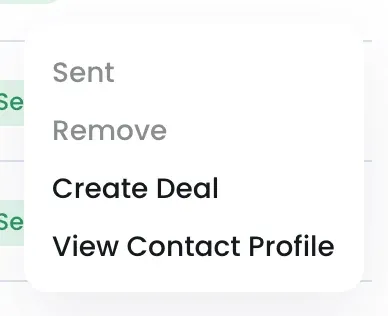
- Click the ⋯ on the recipient row.
- Click Create Deal.
- The Create Deal form opens. Pick the recipient under Buyer Contacts, complete the rest and click Create Deal.
View Contact Profile opens the contact record. Remove takes a contact off the list, and is only available before the campaign is sent.